
A checklist template breaks a job into clear steps you can tick off, so nothing gets forgotten. Checklists work for everything from grocery shopping to cleaning routines and workplace inspections.
This page links to five free checklist examples in Excel and PDF, including grocery, housekeeping, dorm room and weekly cleaning checklists.
What’s Included
- A grocery checklist template
- An Excel checklist template
- A college dorm room checklist
- A housekeeping checklist
- A weekly cleaning checklist
| Template | File format | Hosted on |
|---|---|---|
| Grocery Checklist Template | External site | |
| Excel Checklist Template | Excel (.xls) | External site |
| College Dorm Room Checklist Template | External site | |
| Housekeeping Checklist Template | External site | |
| Weekly Cleaning Checklist Template | External site |
Download the Free Checklist Templates
These examples are hosted on other websites and open from their original source.
Grocery Checklist Template


Excel Checklist Template

College Dorm Room Checklist Template

Housekeeping Checklist Template
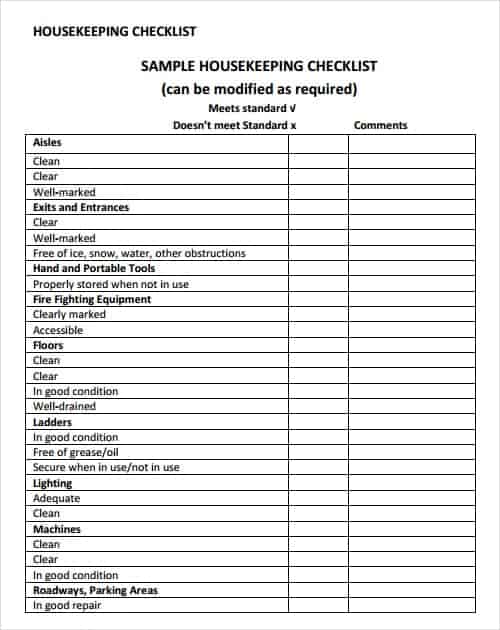
Weekly Cleaning Checklist Template

How to Use These Templates
- Choose the checklist that matches your task.
- Review the items and add or remove anything to suit you.
- Print it or keep it open on your device.
- Tick each item as you complete it.
- Note anything missing or needing follow-up.
- Reuse the checklist next time and refine it as you go.
Who It’s For
Checklists are useful for households, students, cleaners, housekeeping staff, office managers, event planners and anyone with repeatable tasks.
- Shopping and household routines
- Cleaning and housekeeping
- Moving and travel preparation
- Workplace inspections and procedures
Tips for Using a Checklist Effectively
- Define what a tick means. ‘Done’ should mean finished to the required standard.
- Keep items short. One action per line.
- Order items logically. Follow the order you’ll actually do them.
- Don’t overload it. A focused list is more likely to be used.
- Review regularly. Update the list when routines change.
Define What a Checked Box Means
A shop-opening checklist might include “unlock front entrance after staff arrival,” “confirm till opening balance against the record,” and “inspect the public area for obstructions.” Give each item one observable completion condition. Add an owner and time only where these help the handoff. A tick beside “prepare store” is too broad to show what was done.
Choose a simple checkbox list for one person or add owner, due date and evidence columns for a shared process. Keep instructions in a separate procedure when the task needs explanation. Pilot the list during one complete run and remove items that duplicate each other.
For detailed instructions or more specific lists, compare our standard operating procedure (sop) templates, packing list templates, daily schedule templates.
Types of Checklists
According to professionals, using a checklist is essential when doing repetitive tasks, since it is a great tool for improving efficiency by minimizing mistakes and errors. Packing checklists, task checklists, cleaning checklists, travel checklists, and moving checklists are some of the most commonly used types, and each can be made quickly with a well-fitted checklist template. A grocery checklist keeps shopping trips efficient, a housekeeping checklist standardizes cleaning routines, and a project or program checklist ensures nothing is missed during a complex, multi-step process at work.
Frequently Asked Questions
What is a checklist?
A checklist is a list of items or tasks to complete or check, used to make sure nothing is missed.
How do I make a checklist in Excel?
List items in one column and add a column for ticks or a checkbox using the Developer tab.
What is the difference between a checklist and a to-do list?
A checklist covers fixed steps of a routine. A to-do list covers one-off tasks that change.
Related Templates
Open a free checklist template above and make sure nothing gets missed in your next task or routine.

You must be logged in to post a comment.