
A funeral program gives people something simple to follow when the day itself may feel difficult to organize. It can identify the person being remembered, show the sequence of the service and carry a few words the family wants guests to keep.
The two funeral program templates below offer different starting points: a straightforward memorial order of service and a more personal celebration of life program. They are editable single-page Word layouts. Neither assumes a particular faith, ceremony or family structure. Begin with the confirmed service arrangements and keep only the sections that belong.
View the two editable Word downloads
Start with the service that is actually planned
Ask the person coordinating the service for the current sequence before writing the program. A celebrant, faith leader, funeral director or family organizer may already have a working order. Use that as the practical reference rather than borrowing a sequence that does not fit the gathering.
Confirm who has the final say on wording. One named review contact can collect comments from the people who need to be involved without leaving the printer to resolve conflicting versions. The review contact does not need to write everything; their job is to identify the approved copy.
Keep a separate working list of unconfirmed items. A reader should not mistake a possible song or speaker for a settled arrangement. If a contribution is still being discussed, resolve it before printing or leave a suitable space in the working draft.
The program can remain short. A respectful, accurate page is enough when the family wants a simple service. You do not need to fill every section merely because a template offers it.
Choose a memorial order or a celebration of life layout
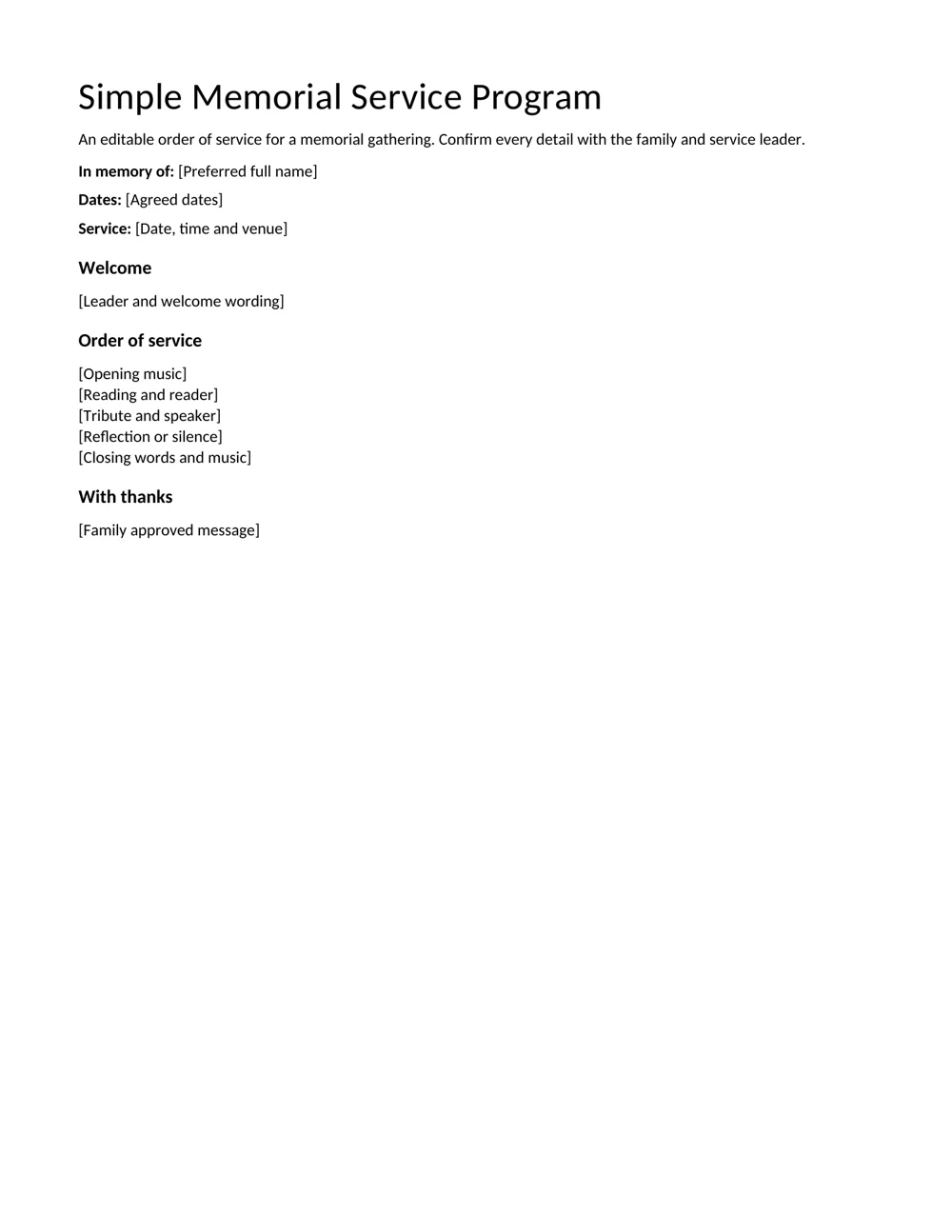
The Simple Memorial Service Program concentrates on the name, agreed dates, service details, welcome, sequence and closing thanks. It suits a gathering where guests mainly need to know what happens next and who is taking part.
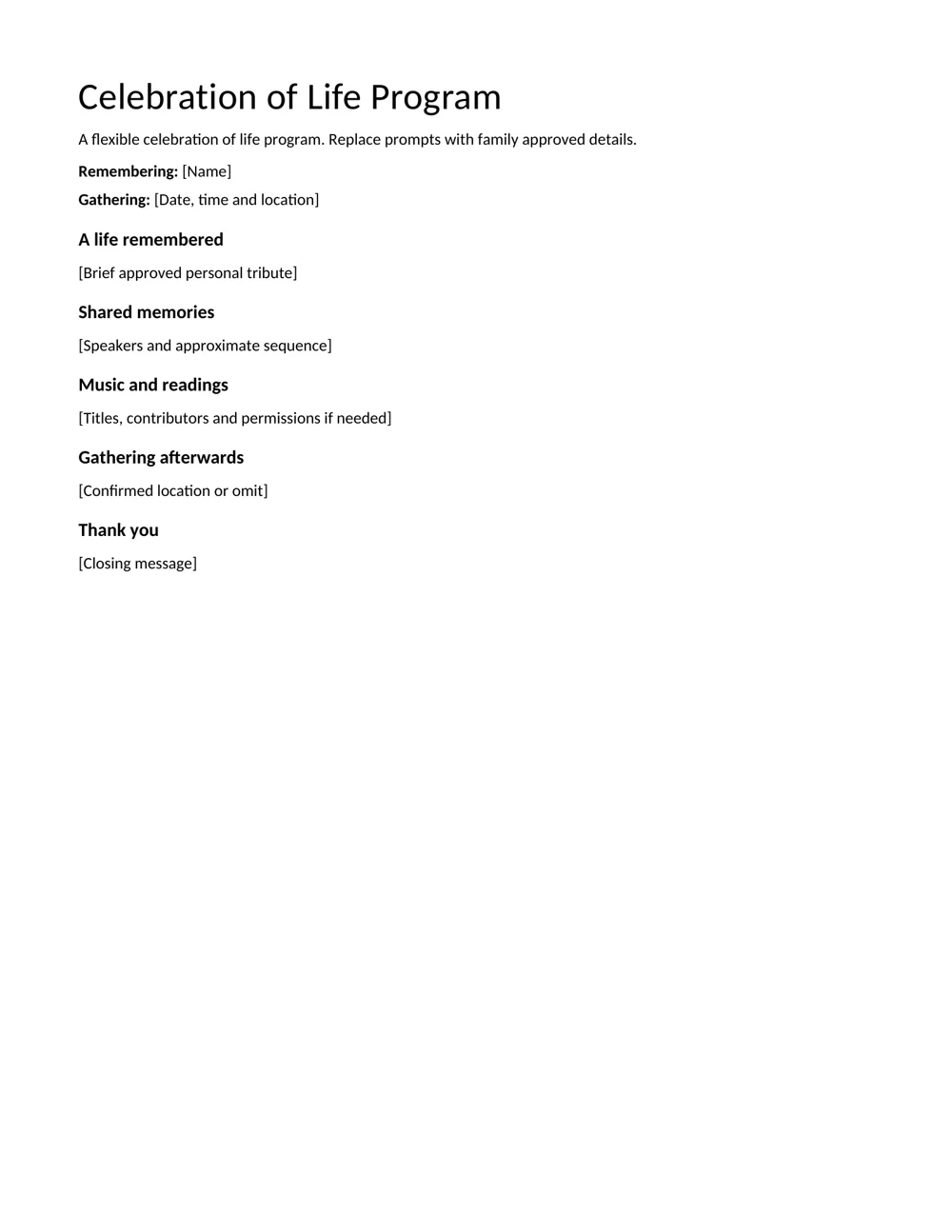
The Celebration of Life Program gives more space to a personal tribute, shared memories and the gathering afterwards. It can be used for an informal remembrance event as well as a service, provided the wording reflects the actual occasion.
Both files can be adapted. Remove a heading that does not apply, add a reader’s name or replace an unused section with a family message. Keep the final order consistent with the leader’s copy, especially if a reading or musical contribution moves during planning.
For a broader event sequence, an event program can help with practical organization. The funeral program should retain the tone and content the family has chosen rather than inherit unrelated event language.
Check the names and dates before polishing the design
Type the person’s preferred name carefully and confirm whether the family wants a full name, familiar name or both. Check spellings directly with the review contact. A well-known nickname may feel right on the page, but the decision should come from the people responsible for the service.
Dates, age and family relationships are optional content choices. Include only the information that has been agreed and verified. If a date is uncertain, do not guess because the layout seems to need one.
Check the venue name, address and service time separately. These details may appear in several places during planning, and an earlier message can contain an arrangement that has since changed. Use the latest confirmation.
Read names aloud during proofreading. This can expose a missing middle name, duplicated word or mistaken relationship that is easy to overlook when looking mainly at fonts and spacing. Ask another person to check the final copy if that is practical.
Write an order guests can follow without explanation
Use plain labels for the parts of the service. Welcome, reading, tribute, reflection and closing music are understandable headings when they describe the planned contributions. Where a ceremony uses specific wording, follow the leader’s confirmed terminology.
Name a reader or speaker when the family wants that information included. Confirm how the person wishes to be listed and whether they are definitely taking part. Avoid publishing a name based only on an early suggestion.
You can include titles of music or readings without reproducing the full work. If the family wants lyrics, a poem or a longer extract printed, check the relevant permission or licensed arrangement before adding it. The template does not grant rights to third-party material.
Detailed minute-by-minute timings are often unnecessary for guests. Keep precise production cues in the coordinator’s working copy if needed. The printed program can show a calm, readable sequence without making the service feel like an appointment schedule.
Let a personal detail carry the tribute
A short tribute can feel more personal when it includes one recognizable detail. A regular walk, a favorite saying, a carefully tended garden or the way someone welcomed visitors may tell the reader more than a long list of general compliments.
Use details the family recognizes and approves. Do not add a story simply because it sounds moving. If several relatives contribute memories, look for a small selection that fits the space and the person being remembered.
A biography outline can help arrange life details before deciding what belongs in the program. The final tribute can be much shorter than that working account. The purpose is a meaningful introduction, not a complete record of every life event.
Keep the voice natural. If the family would never describe the person in formal language, a simpler sentence may be a better fit. Read the tribute aloud and remove wording that sounds borrowed or says more than the family intended.
Make the printed page comfortable to read
Use a clear font and allow enough space between the service items. A program that looks elegant on a large screen may be difficult to read when printed at its intended size. Test the actual size before approving a run of copies.
The supplied files are single-page layouts, not pre-imposed folded booklets. If you want a folded program, plan the page order and printer setup separately. Do not assume that reducing a single page to fit a booklet will preserve readable type.
A photograph is optional. If you add one, use a family-approved image and check that it remains clear in the chosen print method. A dark photograph or a very small portrait may lose detail in a home-printed copy.
Keep essential information as editable text rather than placing the whole program inside a picture. This makes corrections easier and helps the page retain readable names and service details. After any addition, check whether a section has moved onto a second page.
Approve one final version and keep practical notes separate
Before printing, confirm the sequence, names, venue, time and any arrangements after the service. Ask the review contact to approve the exact version that will be used. Identify that copy with a simple date or version reference in the working filename.
Use a preparation checklist for quantities, paper, print collection and delivery to the venue. Those practical tasks are easier to manage outside the guest-facing program.
Print one proof first. Look at it under ordinary light and read it from top to bottom. Check the edges, line breaks and any photograph rather than relying only on an on-screen preview. If you correct a name, issue a new final copy so the earlier version is not printed by mistake.
Keep private contact details and family discussions out of the guest copy unless they have been approved for sharing. The finished program should contain the information and memories intended for the gathering, with the planning notes removed.
A final paper-copy check
If several people are helping, give the printer one named contact and one approved file. Confirm the quantity and where copies should be delivered. Keep a later correction tied to an identified replacement version.
Download the 2 editable Word resources
Simple Memorial Service Program
An editable order of service for a memorial gathering. Confirm every detail with the family and service leader.
Celebration of Life Program
A flexible celebration of life program. Replace prompts with family approved details.
Frequently asked questions
Can I use these for a nonreligious memorial?
Yes. Keep the welcome, memories, readings or reflection that fit the gathering and remove sections that do not. Confirm the final sequence with the service coordinator.
Are these folded booklet templates?
No. They are editable single-page Word layouts. A folded booklet requires a separate page plan and printer setup.
Do I need a photograph?
No. A name, service sequence and short family message can make a complete program. Add a photograph only if it is wanted and approved.
Can I print a poem or song lyrics?
Check the relevant permission or licensed arrangement before reproducing protected material. The downloadable layout does not include rights to another person’s work.
Who should approve the final copy?
Use the family or organizer’s chosen review contact and confirm the service sequence with the person leading it. Print from the approved version.

You must be logged in to post a comment.