
These training guide templates help a trainer explain the work, plan practice and record what the learner can demonstrate. Choose the new employee guide for a first-week learning plan or the task session guide for one practical procedure. Both are editable Word files.
A guide becomes useful when it connects an expected result with an activity and a way to check understanding. A list of topics alone does not show whether someone can perform the work independently.
Jump to the downloadable templates
Choose the right training guide
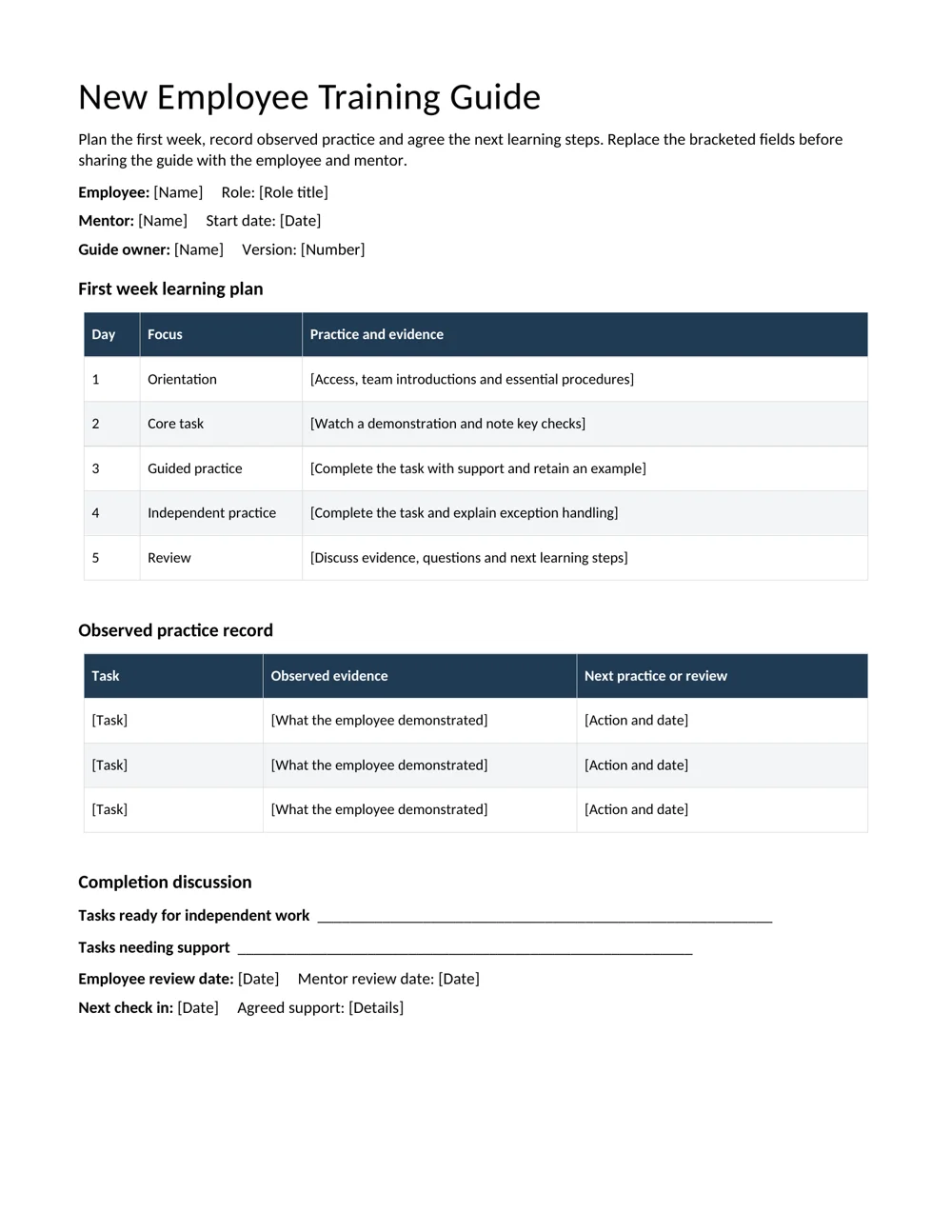
The new employee guide organizes orientation, demonstration, supported practice, independent practice and review across five days. It also includes an observed practice record and space to agree further support. Adapt the sequence to the role rather than treating five days as a fixed deadline for competence.
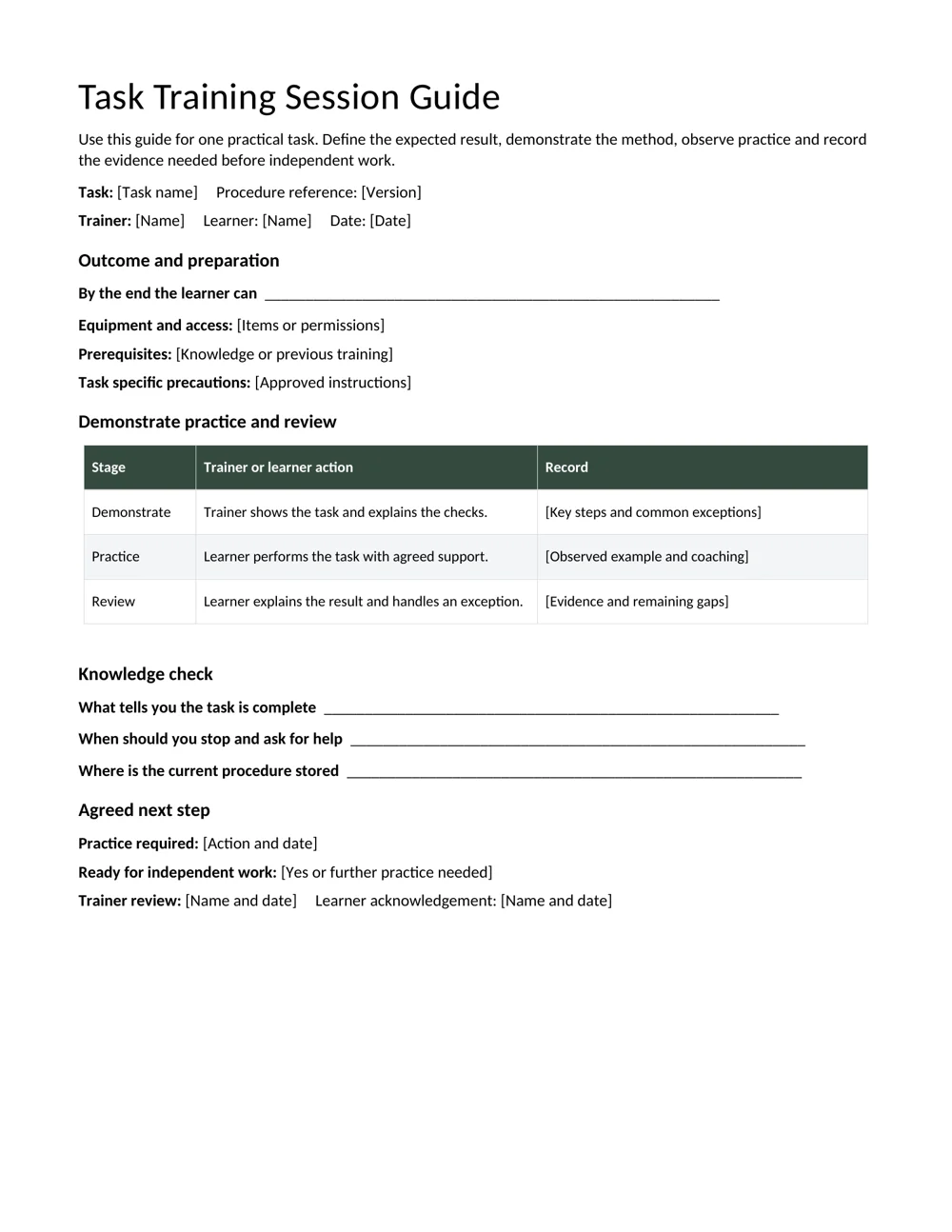
The task session guide is more focused. It records the task, procedure reference, equipment, prerequisites, demonstration, learner practice, knowledge checks and next steps. Use it when an employee needs to learn a specific process or refresh a changed task.
A guide should point to the current standard operating procedure when detailed instructions already exist. This keeps the learning plan aligned with the approved method and reduces conflicting copies.
Write learning outcomes that can be observed
Replace broad statements such as “understand customer records” with an outcome like “create a sample customer record, check the required fields and explain when to ask for help.” The second version gives the trainer something to observe and the learner a clearer target.
Describe the conditions that matter. Will the learner use a practice system, a checklist, a supervisor or an approved reference? State the expected quality of the result and which exceptions should stop the task. Keep those requirements appropriate to the work and the learner’s stage.
Before training begins, confirm access, equipment, sample materials and the current procedure version. Avoid spending most of the session fixing account permissions or searching for examples.
A practical demonstrate, practice and review sequence
- Explain the purpose. Show how the task supports the team and what a correct result looks like.
- Demonstrate the method. Work through an example at a pace the learner can follow. Explain the checks as well as the actions.
- Invite supported practice. Let the learner perform the work and ask questions. Record where coaching was needed.
- Check an exception. Ask what the learner would do if information is missing or a result does not match the expected standard.
- Agree the next step. Record the evidence of readiness or the additional practice needed, with an owner and date.
Use a skills assessment template if you need to compare several capabilities across a role. Keep attendance, course completion and demonstrated capability as separate records.
Worked example: teaching an order entry task
For a sample order entry session, the outcome might be: “Enter a practice order using the approved checklist, confirm the delivery details and identify a missing item code before submission.” The trainer first demonstrates a complete example, then gives the learner a different practice order.
During practice, the learner may enter the items correctly but forget to check the delivery address. Record that specific observation and the follow-up practice. “Needs improvement” gives little direction; “repeat the final address check using two sample orders” tells both people what happens next.
At review, ask the learner to explain where the current procedure is stored and when an uncertain order should be escalated. If the task is ready for independent work, record the evidence and review date. If it is not, agree support without presenting the unfinished session as a failure.
Keep training records useful after the session
Write concise observations about the work rather than judgments about the person. Include the guide version, procedure reference and dates so a later reviewer can understand which method was taught. Update the guide when tools or procedures change.
A certificate of completion can recognize completion of the planned training. It should describe what was completed accurately and should not imply a qualification or authorization the training did not provide.
Before sharing a guide, replace every bracketed prompt, remove irrelevant rows and read it from the learner’s point of view. Check whether someone new can identify the purpose, preparation, practice task, expected result and contact for help. A short guide with clear evidence is more useful than a long document that repeats the manual.
Adapt the session to the learner’s starting point
Ask the learner what related work they have already done and which tools are unfamiliar. Someone experienced in the task but new to the system may need a different session from someone learning both the task and the system for the first time. Record the relevant starting point without assuming a job title proves a particular skill.
Use a short demonstration or question to check prior understanding. For example, ask the learner to explain how they would identify a complete order before showing the new entry process. Their response can reveal whether the session needs to cover the business checks as well as the software steps.
Break a complex task into a manageable sequence. Demonstrating every exception at once can make it difficult to distinguish the normal path from the situations that require help. Start with a representative example, then introduce the exceptions that are important for the learner’s immediate work.
Make room for questions and repetition. A learner may follow a demonstration without being able to repeat it independently. The practice section is the place to discover that gap. Adjust the amount of support based on observed work rather than treating the original session plan as a timetable that must be followed regardless of understanding.
Design practice that shows how the learner thinks
Choose a practice example that is similar to the demonstration but not identical. If the learner merely repeats the same values and clicks, it can be hard to tell whether they understand the checks. Change one or two relevant details and ask them to explain what they are looking for before completing the task.
Include an appropriate exception in a controlled practice setting. An order with a missing delivery field, for example, can show whether the learner notices the gap and knows when to stop. Use practice data and the approved training environment where the work could otherwise affect real records or customers.
Ask the learner to describe their reasoning at key points. “What tells you this is ready to submit?” can reveal more than “Do you understand?” The answer gives the trainer evidence about the checks being used and highlights which part of the process still needs clarification.
Finish with a specific next step. If the learner needs more practice, record the task, the support available and the review date. If they can perform the work to the agreed standard, record the observed example. Keep feedback focused on actions the learner can change rather than broad labels about confidence or ability.
Keep the guide aligned with changes in the work
Assign a guide owner who can check it when the underlying procedure changes. An updated screen, new approval step or different handoff can make an old training example misleading even when most of the task remains familiar. The version and procedure reference fields help identify which instructions the session used.
When a change occurs, review the learning outcome, demonstration, practice example and knowledge check together. Updating one screenshot or instruction may not be enough if the expected result has changed. Remove obsolete examples from the active training folder so a trainer does not accidentally reuse an older version.
Collect short feedback from trainers and learners after the session. Ask where the guide was unclear, which question kept recurring and whether the practice reflected the real task. Use that feedback to improve the next version rather than adding pages of explanation that nobody needs during practice.
Keep an accessible clean master and separate completed learner records. The master supports repeatable preparation; completed copies show what happened in individual sessions. When the guide is reviewed, retain the relevant history through the organization’s record process so later readers can understand the version used without confusing it with the current instructions.
Download the 2 editable templates
Choose a file below. The preview shows the supplied layout; use the download link to open the editable document. Save a clean master before creating your completed copy.
New employee training guide
Plan the first week, record observed practice and agree the next learning steps.
Task training session guide
Prepare one practical session, demonstrate the method and record learner practice and review.
Frequently Asked Questions
What is the difference between a guide and a manual?
A training guide organizes learning activities, practice and review. A manual provides reference instructions. The guide can link to the manual instead of copying every procedure.
Can I change the five-day plan?
Yes. Adjust the days, sequence and support to the role. Readiness should follow demonstrated evidence and the organization’s process, not simply the end of the first week.
What should I record during practice?
Record the task performed, the observed result, the support needed and the next practice or review. Specific observations help the learner act on feedback.
Does completing the guide prove competence?
Completion shows that the planned activities were recorded. Readiness for independent work should be supported by appropriate observation and review.
Are both files editable in Word?
Yes. Both are DOCX documents with editable text and tables. Save a clean master, then create a separate copy for each learner or session.

You must be logged in to post a comment.