
These expense report templates help you turn receipts and trip records into a clear reimbursement request. Choose the travel expense workbook for individual purchases or the mileage workbook for journeys in a personal vehicle. Both downloads are editable Excel files, with example entries and calculation cells.
A useful report answers three questions: what was spent, why it relates to the work, and which amount the employee is asking to recover. Recording those details as you go is easier than reconstructing a trip at the end of the month.
Jump to the downloadable templates
Which expense report should you use?
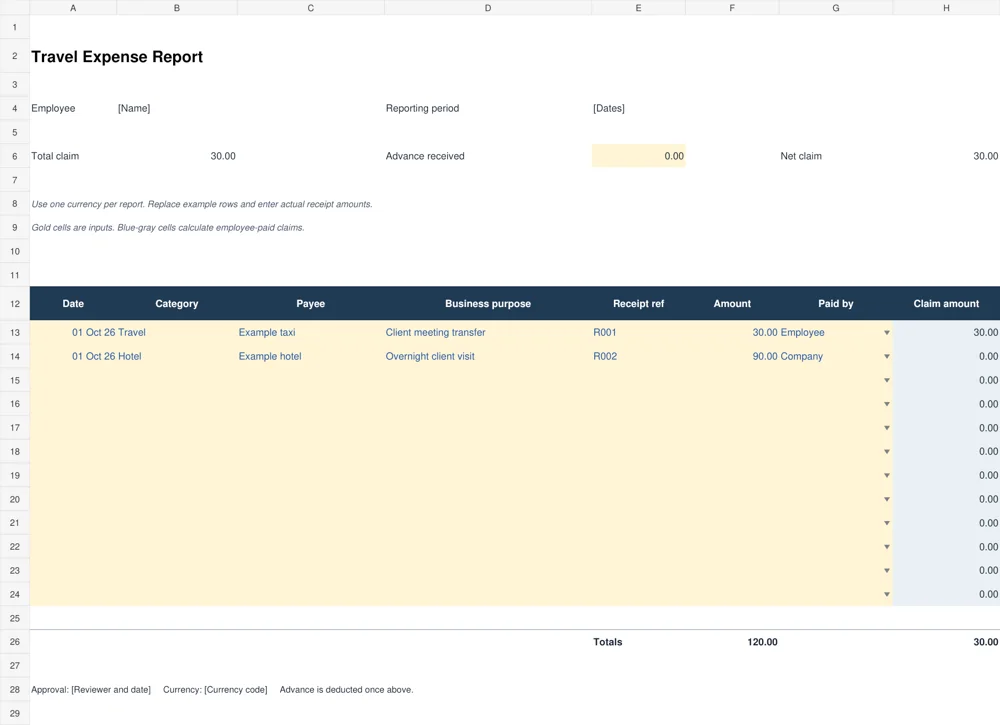
The travel workbook records a date, category, payee, business purpose, receipt reference, amount and payer for each expense. Its claim column includes employee-paid items and excludes items marked Company. Use it when a trip combines your own payments with purchases paid directly by the business.
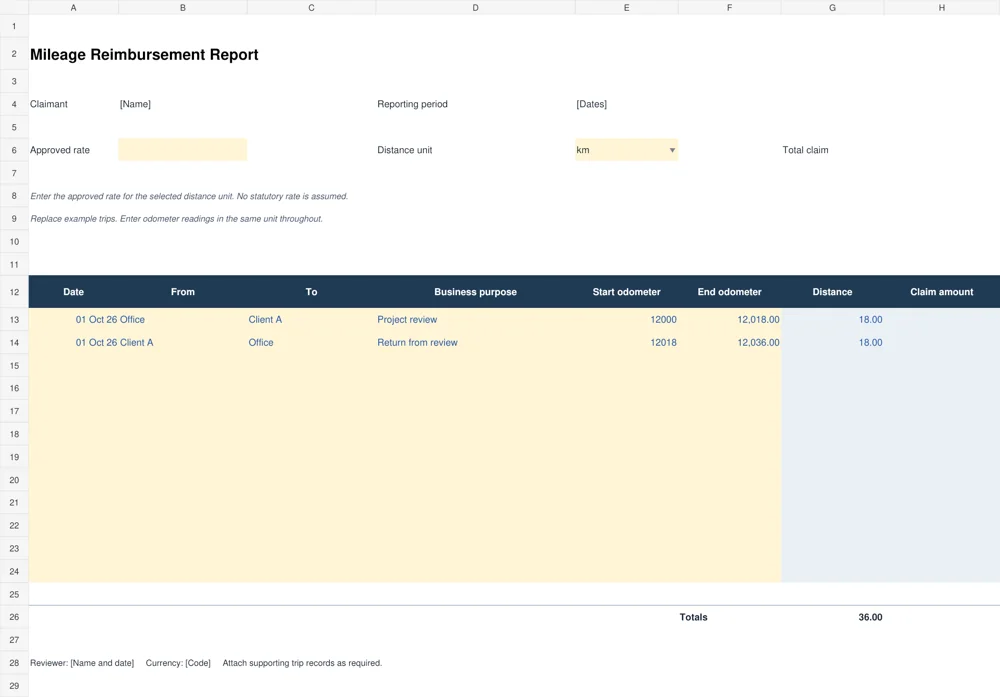
The mileage workbook records a route, business purpose and start and end odometer readings. It calculates distance and multiplies it by the rate you enter. The rate starts blank: choose the approved rate for your organization and distance unit before calculating a claim. These two files cover different records; do not claim the same cost through both methods.
How to complete the travel expense workbook
- Identify the report. Enter the employee, reporting dates, currency and reviewer. Use one currency throughout a report unless you add an approved conversion method.
- Replace the examples. Enter one purchase per row. Describe the purpose specifically, such as “transfer to client review meeting,” rather than simply “business.”
- Match each receipt. Give supporting files references such as R001 and R002, then enter the same reference in the workbook. A taxi receipt template can help organize a transport record when appropriate.
- Select who paid. Choose Employee or Company. Review this field carefully because it controls the amount included in the claim.
- Enter the advance once. The workbook deducts the advance from the employee-paid claim. Do not also enter it as a negative expense.
Keep personal items out of a business claim. If a receipt combines personal and business purchases, record the amount being claimed and explain the allocation in the supporting record. Follow the employer’s process for missing receipts or exceptions.
Worked example: company payments and an advance
Suppose an employee pays 30 currency units for a taxi while the company pays 90 directly for a hotel. The total spending recorded is 120, but the employee-paid claim is 30. If the employee also received an advance of 10, the net claim becomes 20. Reimbursing 110 would incorrectly include the company-paid hotel.
The example rows demonstrate the payer distinction. Replace their dates and amounts before submitting your own report. A negative net result after deducting an advance is a balance to discuss with the reviewer; it is not automatically an amount to pay the employee.
Recording mileage consistently
Choose kilometers or miles, then use that unit for every odometer reading and for the approved rate. A start reading of 12,000 and an end reading of 12,018 records a distance of 18. A return journey from 12,018 to 12,036 adds another 18, producing 36 total units of distance.
At an illustrative rate of 0.50 per unit, that distance produces a claim of 18 currency units. This is a calculation example, not a prescribed reimbursement rate. Add the organization’s approved rate and supporting trip details. For a running record across many trips, use the vehicle mileage log templates alongside the claim.
Review the report before submission
Check that dates fall inside the reporting period, receipt references exist, amounts match the evidence, and payer selections are correct. Confirm that the mileage unit matches the rate and that end readings are not below start readings. Formula cells should remain intact when example data is replaced.
If you extend the sheet, copy the formulas and formatting into the new rows and confirm the totals include them. The supplied workbooks calculate only within their existing entry ranges. Test a small known amount after structural changes instead of assuming the total expanded automatically.
When reconciling payments, a bank statement template can provide a separate overview, but the claim should still retain its receipt and purpose details. Save the approved report with the evidence so a later reviewer can follow the calculation.
Set up the evidence before the reporting period closes
Create a simple folder for the report and use the receipt references as file names or prefixes. For example, R001 can refer to the taxi receipt and R002 to the hotel document. Keep the date and purpose in the workbook, where the reviewer can read them alongside the amount. A folder full of images with unrelated camera names makes the same review much slower.
Agree how expenses will be grouped before several people start entering data. One person may use “Transport,” another “Taxi,” and another “Travel” for the same type of purchase. A consistent category list makes later summaries easier to compare. Keep the payee separate from the category so a supplier name does not become a new category by accident.
For purchases in another currency, retain the original receipt and document the conversion method required by the organization. The supplied travel workbook has a single amount column and does not perform currency conversion. A practical approach is to complete a separate report for each currency or add a clearly labeled conversion record through the reviewer’s process.
Check image legibility before discarding any temporary capture. A receipt reference is useful only if the supporting file can still show the relevant purchase, date and amount when the reviewer opens it.
Handle corrections without losing the explanation
If a reviewer questions an entry, record the issue against its receipt reference and correct the specific field. For example, an item may have the right amount but the wrong payer selection. Changing Company to Employee affects the claim total, so the reason for that change should be clear to the people approving the report.
A missing receipt and a missing business purpose are different problems. The first needs the appropriate supporting-evidence process; the second needs an explanation of the work connection. Adding a vague note to every row does not resolve either issue. Keep the response tied to the purchase so the reviewer does not have to infer which entry it concerns.
When a report is returned for correction, use a revision label or an agreed shared copy. Avoid sending several files called “final” with different amounts. The employee, reviewer and payment team should be able to identify which version was approved and whether an earlier version has already been processed.
If the amount changes after approval, follow the normal adjustment process rather than quietly altering the archived copy. Keep enough history to explain the original calculation and the later correction. This is especially useful when the payment appears in a different period from the purchase.
Run a short handoff check with a known calculation
Before handing over the report, choose a small sample you can calculate independently. In the travel sheet, enter a temporary employee-paid amount in an unused example copy and confirm that it increases the claim by the same amount. Changing that row to Company should remove it from the employee claim while leaving it in the spending total. Remove the temporary test before submission.
For mileage, check one journey from its readings, then multiply the resulting distance by the entered rate. Confirm that the selected unit is the same unit used for the rate. Changing the unit label alone does not convert the readings or the rate, so do not switch from kilometers to miles halfway through the report.
Ask the reviewer whether any amount remains unresolved before the file moves to payment. A report can be arithmetically correct while still containing an unsupported or unapproved entry. Keep that distinction visible rather than hiding an open issue inside a total.
The final handoff should include the approved report, the supporting references and the information needed to identify the reporting period. Once processed, retain the approved copy in the agreed location. That gives the employee and organization a common record if a later payment question arises.
Download the 2 editable templates
Choose a file below. The preview shows the supplied layout; use the download link to open the editable document. Save a clean master before creating your completed copy.
Travel expense report
Record purchases, receipt references, payer and an advance. Employee-paid claim amounts calculate from the entries.
Mileage reimbursement report
Record routes and odometer readings, then enter the approved rate for kilometers or miles.
Frequently Asked Questions
Are these expense reports editable?
Yes. Both downloads are XLSX workbooks. Replace the example inputs and keep calculation cells in place. Check formatting and formulas if you open them in a different spreadsheet application.
Does the mileage file include an official rate?
No. Enter the approved rate for the selected unit and your organization’s process. The blank rate prevents an example from being mistaken for a current official rate.
Why is a company-paid item excluded from the claim?
It records spending the company has already paid. Including it again in the employee claim could reimburse the same purchase twice.
Can I add more expense rows?
Yes, but copy the formulas and update the total ranges. Verify the expanded workbook with a known sample before using it for a real claim.
Should I send receipts with the report?
Follow the reviewer’s requirements. Matching receipt references to the report makes it easier to check amounts and resolve questions without searching through unrelated files.

Leave a Reply
You must be logged in to post a comment.