
“Twenty blue boxes, delivered on Friday” sounds like a complete request until someone asks which size, what shade of blue and which Friday. Useful order form templates bring those details together before a request reaches the person packing or scheduling the work.
The two downloads below cover different situations: an itemized goods order and a custom service request. Both are editable Word files. They give customer preferences and provider confirmation separate places, so an unanswered question does not disappear inside an apparently finished form.
View the two downloadable Word templates
Which form fits the request on your desk?
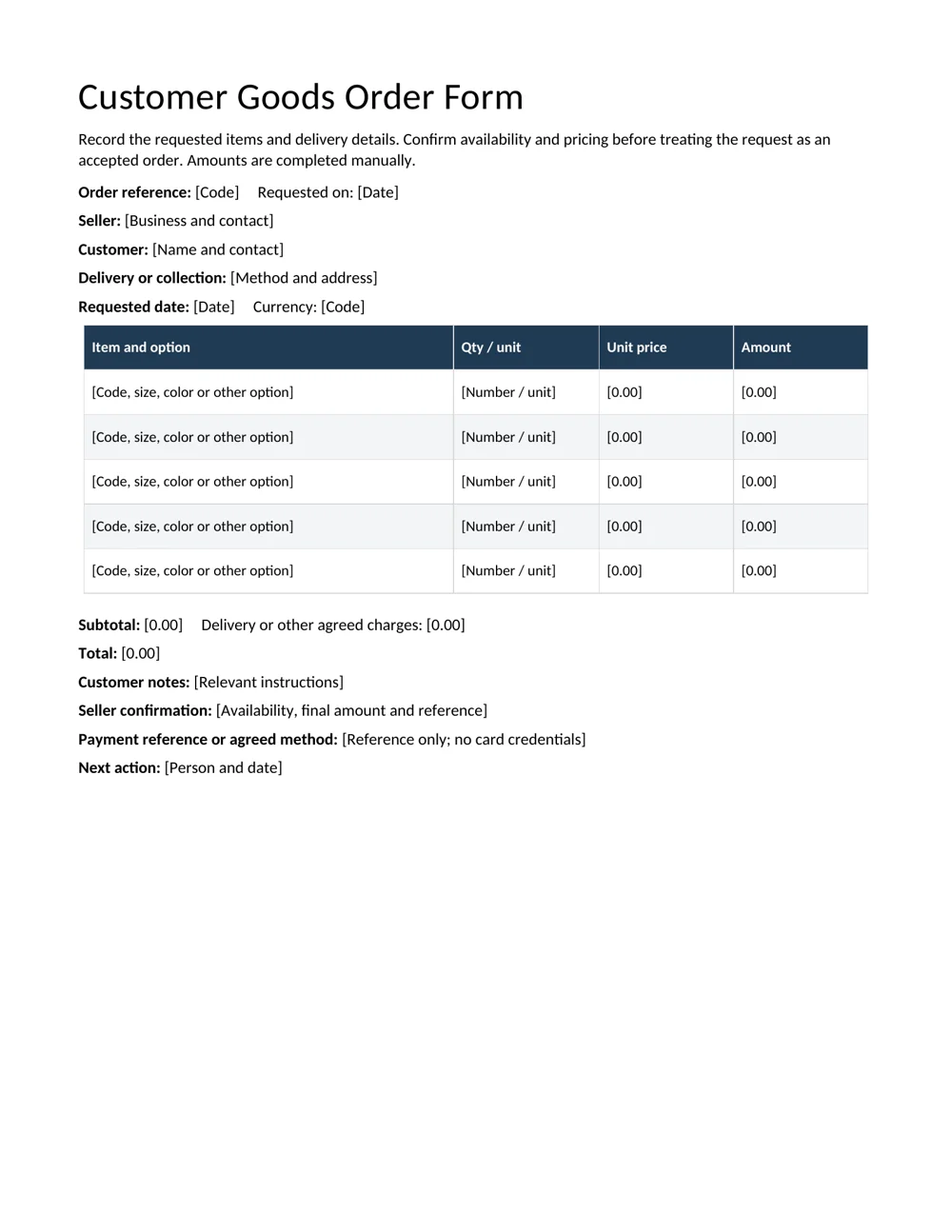
Use the goods form when the customer can identify the items and quantities being requested. It includes options, unit prices, line amounts, delivery or collection details, notes and seller confirmation. Amounts are entered manually.
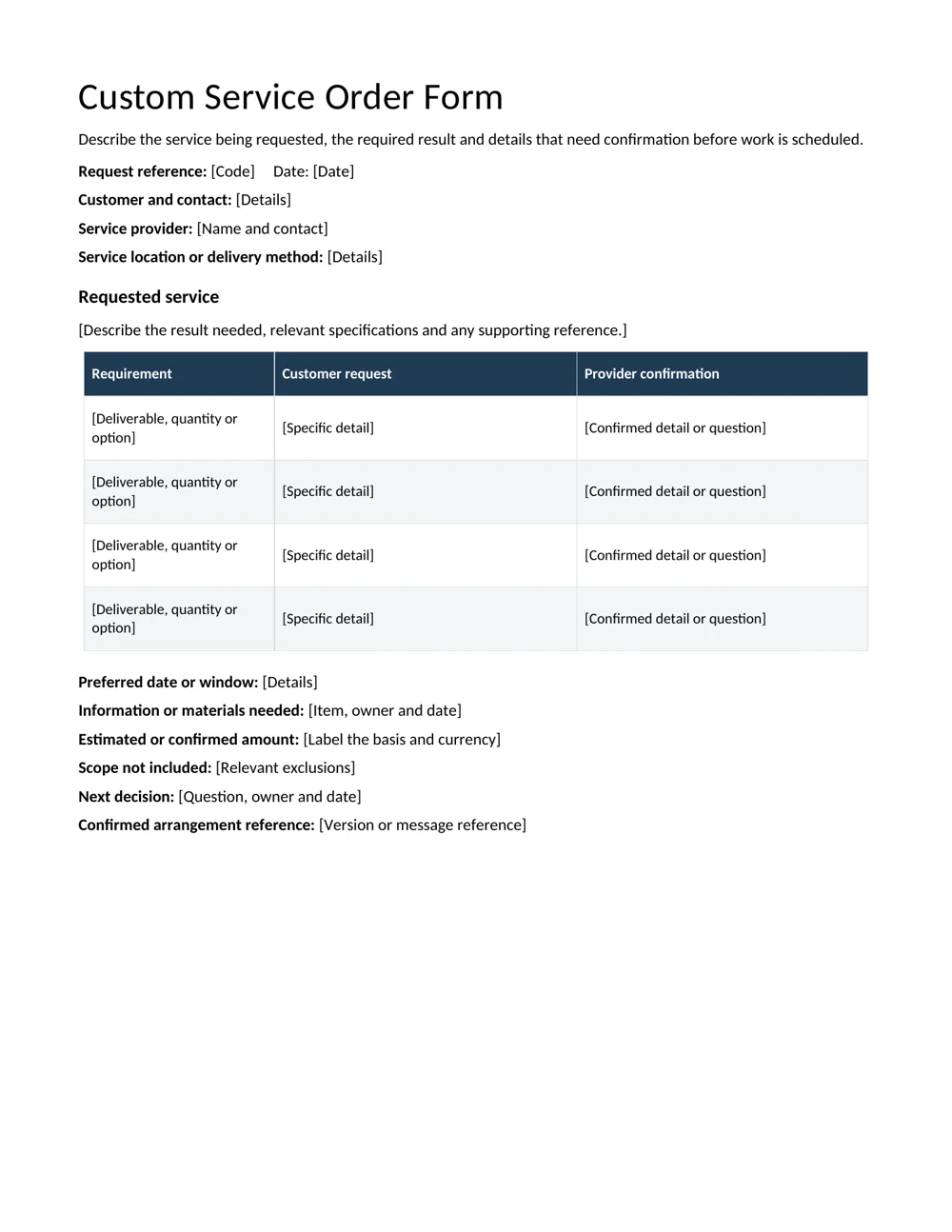
The custom service form starts with the result the customer wants. Its requirement table separates the request from what the provider confirms. That distinction is useful when timing, materials or the scope still needs discussion.
For example, a request for twelve printed menus can usually be described through quantity, size and finish. A request to redesign the menu may need a brief, a review process and a delivery format before the work can be scheduled.
Neither document decides which requests your business accepts. Use the confirmation area to record the arrangement reached through your process. If the request is incomplete, the next action should name the question and the person handling it rather than imply that everything is ready.
You can simplify either form. Remove fields that do not serve the order, but keep the details another person would need to identify the customer, understand the request and find the current confirmation.
Describe the item so two people picture the same thing
A product name alone may leave several choices open. Record a code where available and add the options that distinguish the item: size, color, material, finish, pack quantity or another relevant specification. Use the terminology the customer and fulfillment team can understand.
Write quantities with units. Five packs and five individual items can produce very different orders. If a pack contains several items, explain the pack basis rather than expecting the reader to infer it from a familiar product name.
Use a price list as a reference when appropriate, then confirm which price applies to this request. A copied list does not necessarily resolve a custom option, delivery charge or different quantity.
For instructions that cannot fit comfortably in a row, use an attachment reference and make sure the correct version accompanies the form. A color sample, approved artwork or specification can be more precise than a long informal description.
Do not treat the customer notes field as a substitute for the main item details. Important options belong where the person checking the line will see them, not at the bottom of a page they may overlook.
Check the arithmetic once the choices are clear
Consider an illustrative order for twenty folders at 3 currency units each and ten dividers at 2 each. The folder line is 60 and the divider line is 20. The subtotal is therefore 80.
If the confirmed delivery charge is 6 and no other charge applies in this example, the total is 86. Show the delivery separately so the customer and provider can follow the calculation. The numbers demonstrate the form; they are not suggested prices.
Now change the folders from twenty to twenty-five. The folder line becomes 75, the subtotal becomes 95 and the same delivery charge gives a total of 101. In the supplied Word form, none of those totals updates automatically.
Check the currency and the basis of every stated charge. If a price or additional charge is not yet confirmed, label the amount accordingly and identify the next decision. A neat total should not hide an unresolved selection.
When the business uses a pro forma invoice at this stage, keep the references connected and compare the same quantities and options. Two related documents should not quietly describe different orders.
Delivery details deserve their own review
Confirm whether the customer wants collection, local delivery or another arrangement. Record the relevant address or collection point and the contact needed to resolve a practical question. A billing address is not automatically the delivery address.
Distinguish a requested date from a confirmed date. The customer may prefer Friday, while the provider still needs to check availability or preparation time. Record the actual agreement before the request is handed to the fulfillment team.
Use complete dates when a relative phrase could become unclear. A printed form that says “next Friday” may be read several days after it was written. The reference date and confirmed arrangement should remain understandable without the original conversation.
Include practical instructions only where they affect the order. A useful note might identify an agreed collection window or delivery entrance. Avoid collecting unrelated information that makes the form harder to review.
For repeat customers, check the current details rather than trusting the last completed form. A client information sheet can hold the separate contact record, while the order form records the details relevant to this particular request.
A service order needs a result, not just a job label
“Design work” tells a provider very little about the expected output. A more useful request might identify a two-page menu layout, the file formats needed, the content the customer will supply and the review point before the final version.
Use the service form’s confirmation column to resolve each important requirement. The provider may confirm a format, ask for missing copy or explain a dependency. Keep an open question visible until it has an answer.
Record who supplies the materials or information and when. If the requested date depends on receiving text or images, identify that dependency rather than making an unsupported scheduling promise.
Be specific about the work not included when a reasonable reader might assume otherwise. For the menu example, printing may be a separate service from design. The form should make the relevant boundary clear without becoming a long document of unrelated conditions.
The purpose is a shared description of the request and confirmed arrangement. Where the business needs additional reviewed terms or a separate agreement, use its appropriate process rather than assuming an editable request form replaces every other document.
Read the form as if you were receiving the handoff
Imagine a colleague opening the order without access to the original messages. Can they identify the item or service, the quantity, the relevant options, the delivery arrangement and the confirmation reference? If they still need to guess, the form needs another pass.
Check names and references independently from the amounts. Correct arithmetic does not compensate for a request filed against the wrong customer or a specification taken from another version.
Give unresolved items an owner and date. “Confirm the final color sample with the customer before preparation” is a practical next action. “Details to follow” leaves the recipient without a clear responsibility.
Keep payment handling within the business’s approved method. The form can carry an agreed method or transaction reference without asking someone to type card credentials into a general Word document.
Before sharing the file, remove unused prompts and preview the page. A long custom instruction may have shifted a row or created another page. Readability matters because the people checking and fulfilling the order need to find the same information quickly.
Keep amendments connected to the original request
Customers sometimes change quantities, options or dates. Give a revised form a recognizable version or reference and explain the change. The person using the earlier copy should be able to tell that it has been replaced.
Update all affected details. A quantity change can affect line amounts, total, preparation time and delivery arrangements. Correcting one box does not necessarily resolve the rest of the order.
Retain the relevant earlier confirmation through the normal record process. This helps the team understand what was requested and what was later changed without reconstructing a conversation from disconnected messages.
When the order moves into fulfillment or billing, carry the correct reference forward. The request, confirmation and later record should remain distinguishable while describing the same agreed work.
For the next order, begin with a clean master. Reusing the format is helpful; carrying forward someone else’s address, options or date is not. Review the few details that define this order rather than assuming familiarity makes another check unnecessary.
Download the 2 editable Word templates
Customer Goods Order Form
An itemized customer request with product options, quantities, delivery details and a separate seller confirmation.
Custom Service Order Form
A service request organized around deliverables, specifications, scheduling and the provider confirmation.
Frequently asked questions
Are these order forms for customers or suppliers?
They are customer-facing request formats for goods and custom services. Adapt the labels to your process and record the provider’s confirmation separately from the initial request.
Do the forms calculate prices?
No. They are editable Word documents. Complete and check line amounts, charges and totals manually whenever the inputs change.
What if an option is not confirmed?
Label it as unresolved and record the question, owner and next check. Do not let an empty or ambiguous field look like an agreed specification.
Can I use the service form for a custom product?
Yes, when the work needs a description, specifications and confirmation before it is prepared. Keep the requested result and open decisions clear.
How should I record a changed order?
Identify the revised version, explain the change and update every affected amount or arrangement. Keep the relevant earlier record through your normal process.

You must be logged in to post a comment.