
These attendance sheet templates provide two simple ways to record participation: a daily session sheet with time-in and time-out fields, and a weekly register for the same group across five dates. Both are editable Word documents.
Choose the format based on the question you need to answer. A one-off session may need arrival times; a recurring class may need a quick view of participation across the week. Agree the recording rules before the sheet is used.
Jump to the downloadable templates
Choose daily attendance or a weekly register
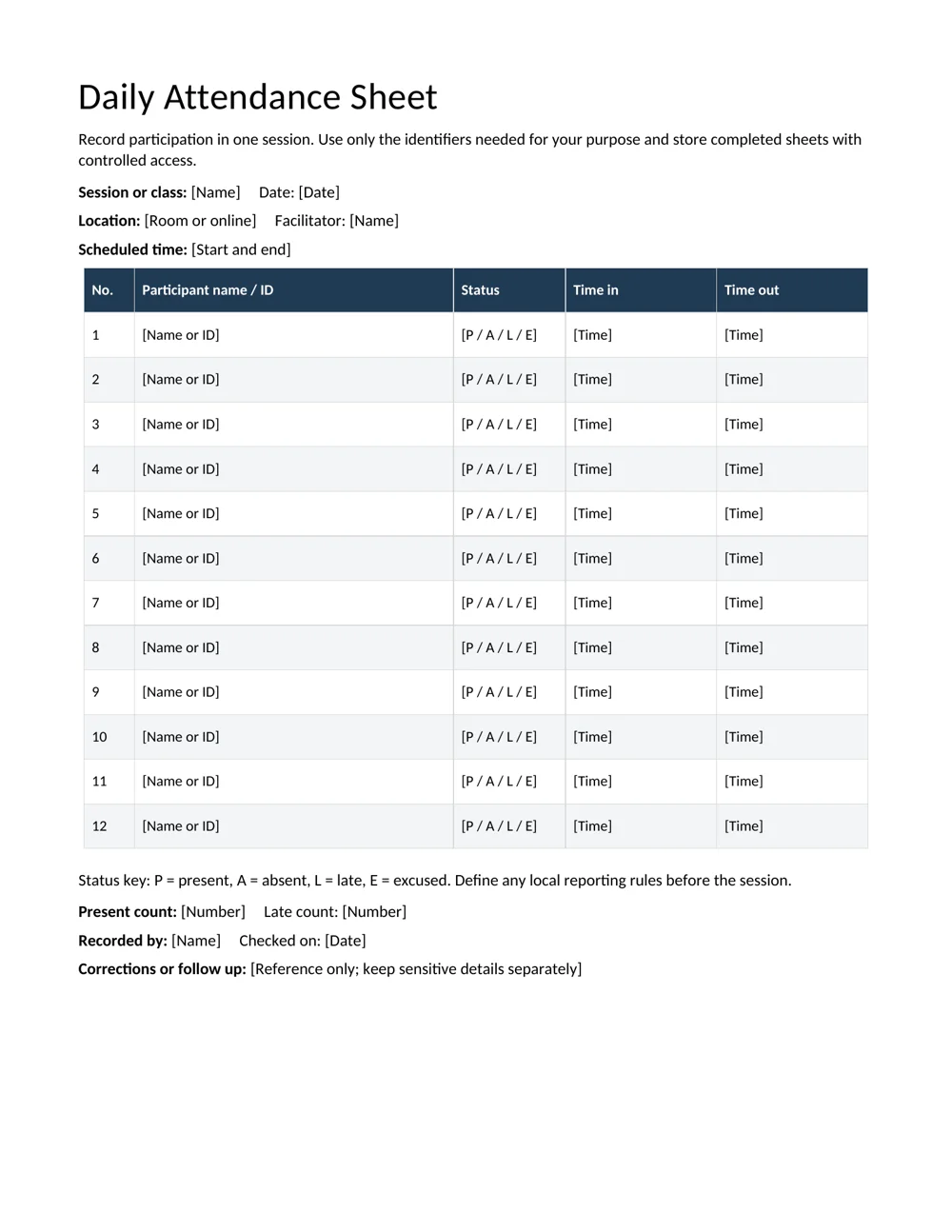
The daily sheet includes session name, date, location, facilitator, scheduled time, participant name or ID, status and entry and exit times. It is useful when the detail of a particular session matters.
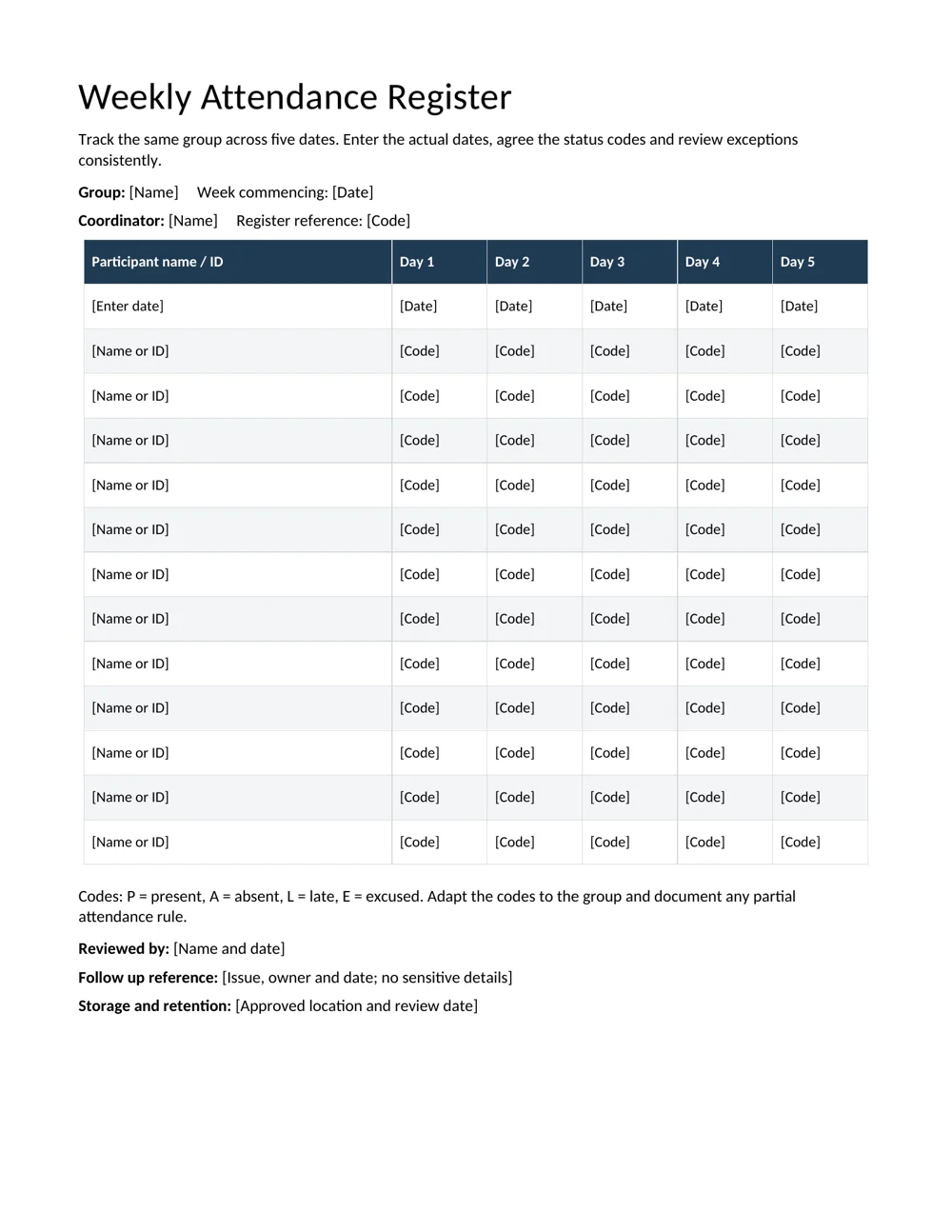
The weekly register keeps one participant per row and five dates across the page. It is easier to scan for recurring absences, but it does not provide the same space for detailed arrival and departure times. Replace Day 1 through Day 5 with the actual dates before sharing or printing.
Use a weekly planner for the planned sessions and the attendance sheet for what actually happened. A schedule and a participation record should stay distinguishable.
Set a clear status key
The supplied key uses P for present, A for absent, L for late and E for excused. Adapt those codes if the group uses different terms, but explain the key on every version. Avoid using the same code for two meanings.
Define how late arrival, early departure, cancellations and partial participation are handled. A blank cell is ambiguous: it could mean absent, not yet recorded or not applicable. Use an agreed status or a clearly explained notation rather than asking a later reviewer to guess.
If you summarize attendance, decide which statuses count toward that particular summary. The templates do not automatically calculate rates or decide eligibility. Document the reporting rule separately when it affects a course, program or internal requirement.
Record attendance consistently
- Prepare the session details. Enter the date, group, location and person responsible for the record.
- Check the roster. Use names or identifiers that distinguish participants without collecting unnecessary details.
- Record the status at the agreed point. Choose a consistent time or method for marking attendance.
- Update changes. Record a late arrival or early departure according to the agreed rule, including times where needed.
- Review the sheet. Check missing entries, duplicate names and unclear corrections before finalizing it.
A short checklist can help coordinators repeat the same preparation and review steps across several sessions.
Worked example: a recurring workshop
Imagine a workshop that meets on five mornings. The coordinator places the actual dates at the top of the weekly register and explains the P, A, L and E codes to the person recording attendance. One learner arrives late on the second morning; that cell receives L under the agreed rule.
If the weekly report needs an overall participation count, the coordinator applies the documented counting rule rather than automatically treating every L as a full day or an absence. If an arrival-time record is needed, the daily sheet provides the more detailed evidence.
At the end of the week, the coordinator checks remaining blanks. A canceled session should be identified consistently for the group, rather than making every participant appear absent. Corrections should remain understandable to the person reviewing the final record.
Keep the record proportionate and easy to review
Attendance sheets may be seen by several people, so include only the information needed for the purpose. Keep detailed personal explanations and sensitive circumstances in the appropriate separate record. The follow-up field can contain a reference and owner without repeating those details.
Use the approved storage location and access arrangements for the group. Add a review date and follow the organization’s retention process for completed records. A printed sign-in sheet should not become a reason to collect unrelated contact or identity information.
If attendance supports a completion record, check the program’s actual completion requirements before issuing a certificate of completion. Presence alone may not show that every learning activity or assessment was completed.
Before printing, preview the edited document and make sure the names, dates, status key and writing space remain readable. Add rows or pages as needed and repeat the session or week information so separate pages can be identified.
Decide how totals will be interpreted before reporting
A total is only meaningful when the counting rule is clear. A report might count people present at a session, sessions attended by one learner or hours of participation. Those are different measures and should not share an unexplained label such as “attendance total.”
For a simple example, if a learner attends four of five scheduled sessions and each session is counted equally, the session attendance rate is four divided by five, or 80 percent. That example assumes all five sessions were scheduled for that learner and the reporting rule treats the four recorded sessions as attended.
A canceled session changes the question. If only four sessions took place, do not automatically leave the canceled date in the denominator and mark every learner absent. Apply the documented rule and explain the treatment so a later reader can reproduce the summary.
Likewise, decide how late or partial participation is reported before calculating percentages. The Word register records the codes but does not choose their meaning for a particular program. Keep the raw record and the summary rule together, so a number in a later report can be checked without guessing how the codes were converted.
Make corrections traceable and easy to understand
Agree who can correct a completed attendance record and how the correction will be noted. An entry may be wrong because the recorder missed an arrival, used the wrong row or carried a code into the wrong date. The correction should identify the affected participant and session clearly.
For a printed sheet, use the organization’s correction method so the final status remains readable. For a shared digital document, avoid several people editing separate copies without a clear current version. A date and reviewer field can help distinguish the reviewed record from an earlier working sheet.
Check duplicate names carefully. Use an appropriate participant identifier if two people have the same or similar names. Do not collect unrelated details merely to make the sheet look more complete. The identifier needs to help match the attendance to the correct person and purpose.
When follow-up is needed, record an owner and reference rather than a long personal explanation in the attendance cell. This keeps the register useful to the people recording participation while directing more detailed discussion to the appropriate record and audience. Review the final copy for unclear blanks before using it as the basis for a summary.
Prepare the sheet for repeated use
Keep a blank master with the status key, labels and layout already agreed. Make a fresh copy for each session or week and enter the actual dates immediately. A reused file with an old date can be harder to spot than a missing participant entry.
For a group larger than the supplied rows, add rows or continue on another page. Repeat enough identifying information to connect every page to the same session or week. Page numbers, group name and date help prevent a detached sheet from being filed under the wrong event.
Check the printed writing space after adding columns. A signature field, participant ID and separate arrival and departure times can make a portrait page crowded. Remove fields that are not needed or adjust the layout while keeping names, dates and status codes readable.
At the end of the period, carry out a short review: confirm the dates, resolve blanks, check totals against the underlying entries and record who reviewed the sheet. Store the reviewed version in the approved location and prepare the next clean copy. This routine makes the record more dependable without turning a simple attendance process into unnecessary paperwork.
Download the 2 editable templates
Choose a file below. The preview shows the supplied layout; use the download link to open the editable document. Save a clean master before creating your completed copy.
Daily attendance sheet
Record one session with participant status and time-in and time-out fields.
Weekly attendance register
Record the same group across five dates using a clearly defined status key.
Frequently Asked Questions
Can I use these sheets for classes or staff training?
Yes. Adapt the labels, status key and recording rules to the group. Confirm that the chosen format captures the detail required for the purpose.
Do the Word files calculate attendance percentages?
No. They are editable records. Any summary should use a clearly defined counting rule and be checked separately.
What should a blank cell mean?
Define that before use. It is usually clearer to mark the appropriate status or an explained not-applicable code than to leave a cell open to interpretation.
Can I add signatures?
Yes, if a signature is needed for the process. Add a column and check the printed layout so participants still have enough writing space.
How should I record reasons for absence?
Keep the attendance status on the sheet. Store detailed or sensitive explanations separately through the appropriate process and use a reference when follow-up is needed.

You must be logged in to post a comment.